Close the load with complete numbers
Record payment, miles and load expenses. Closeout checks for missing payment, expense information and unbilled extra charges before treating the result as complete.
Explore Backhaul / Actual profit
Compare the original estimate with the result after payment and recorded expenses. Then step back and review revenue, costs, profit per mile and open payments across your operation.
Start with 14-day solo trial →No card upfront. Works on your phone and desktop.
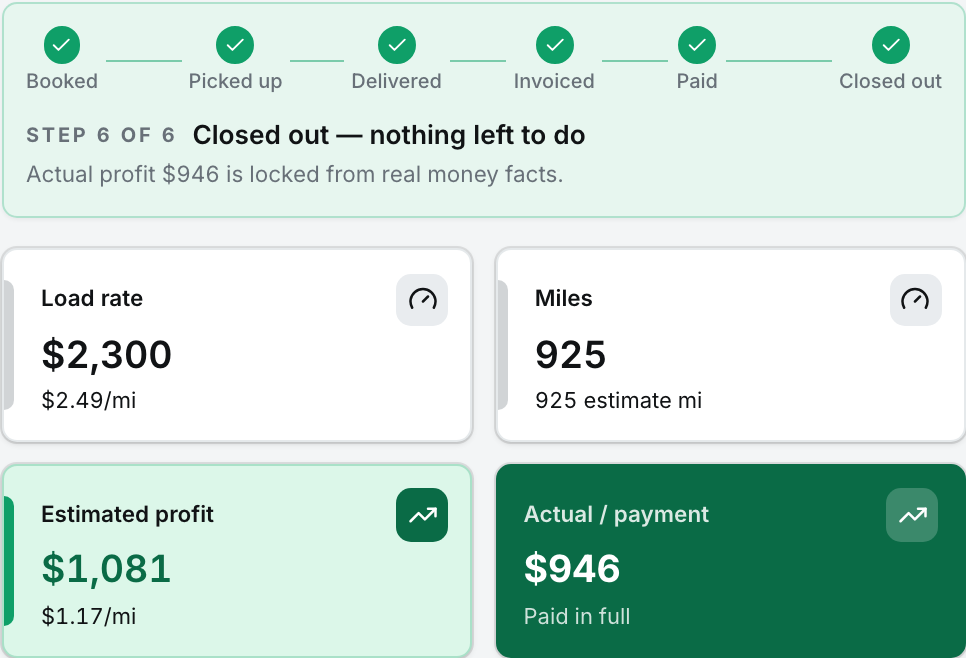
The same load estimated $1,081 and finished at $946 before tax. See the result after payment and recorded costs.
View full-size screen (opens in a new tab)Record payment, miles and load expenses. Closeout checks for missing payment, expense information and unbilled extra charges before treating the result as complete.
See how the completed load compares with the earlier estimate. Use the difference to review the costs and assumptions behind your next decision.
The money view brings revenue, expenses, net profit, profit per mile and document gaps together. Paid-load results and open payments stay distinct. Review suggested set-asides and owner allocation using your configured inputs.
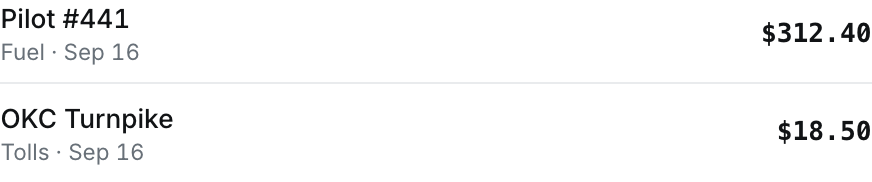
Fuel and toll expenses stay itemized with the load, ready to review at closeout.
View full-size screen (opens in a new tab)No. Actual load profit uses recorded payments, expenses and the cost profile. It depends on complete inputs and is not a bank balance or tax return. Suggested set-asides and owner pay are planning figures to review against your bills and obligations.
No card upfront. Start with an offer you already have.
The rest of the workflow
Allow optional analytics and diagnostics so we can see which features work and fix reliability problems. No load details, routes, documents, or advertising IDs.