Keep costs attached to the right truck
Manage truck details and cost profiles so a load decision has the right operating context. Maintain your company details and recurring expense inputs as your operation changes.
Explore Backhaul / Trucks & drivers
Keep truck profiles, driver assignments and load results connected. Review the operation as a whole and see where individual trucks need attention.
Start with 14-day solo trial →No card upfront. Works on your phone and desktop.
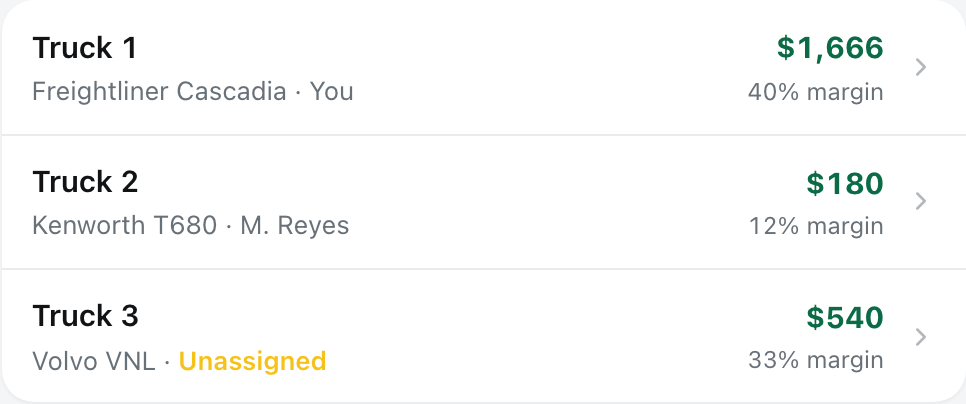
Compare profit and margin by truck, with the assigned driver beside each result.
View full-size screen (opens in a new tab)Manage truck details and cost profiles so a load decision has the right operating context. Maintain your company details and recurring expense inputs as your operation changes.
Manage driver records, assignments and pay rules. Keep the people and equipment behind each load visible alongside its status, expenses and payment record.
Review profit and margin by truck alongside the business money view. Follow open payments and missing paperwork through the underlying loads instead of judging the fleet by gross revenue alone.
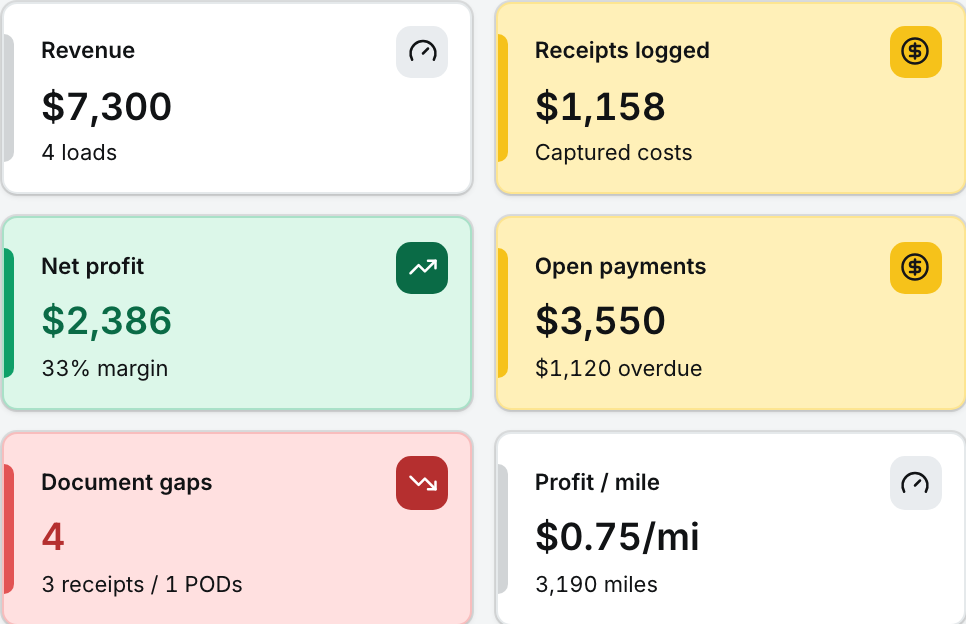
Review profit, open payments and missing paperwork together, then follow up on the loads behind them.
View full-size screen (opens in a new tab)The Small Fleet plan covers 2–5 trucks. See the pricing section for the current founder offer and terms. Driver pay rules support cost tracking; they are not a promise of payroll processing.
No card upfront. Start with an offer you already have.
The rest of the workflow
Allow optional analytics and diagnostics so we can see which features work and fix reliability problems. No load details, routes, documents, or advertising IDs.